- Implementing 301 permanent redirects for discontinued items allows retailers to preserve 90-95% of earned link equity and historical authority instead of losing value to 404 errors.
- Redirecting retired product URLs to the most relevant successor or subcategory page satisfies user intent and prevents potential customers from bouncing out of the ecommerce sales funnel.
- Properly managing broken links improves crawl budget efficiency by ensuring search engine bots focus on active inventory rather than wasting resources on dead pages.
- For temporary stock issues, maintaining an HTTP 200 OK status while removing Offer properties from Product Schema helps preserve search rankings without incurring penalties.
- High-traffic legacy pages should be converted into informational resource hubs to capture top-of-funnel research queries and maintain organic visibility long after a product is retired.
Retailers often make the mistake of deleting product pages immediately after an item sells out for the last time. Removing pages too quickly results in a significant 404-driven loss of traffic in the e-commerce funnel. When these URLs disappear, the organic traffic they once attracted vanishes, leaving potential customers staring at a dead end. These discontinued product pages accumulate historical backlinks and social shares that contribute to the domain's overall authority.
Managing this transition requires a redirect-mapping protocol that combines technical redirects with user experience enhancements. By proactively addressing inventory turnover, businesses can preserve their established search rankings and guide users toward active alternatives. Understanding the mechanics of these systems is the first step toward protecting your site against traffic loss. The following strategies show how to turn inventory hurdles into opportunities for lasting search visibility.
Understanding the SEO Risks of Product Discontinuation
Sunsetting a product is more than a simple logistical update for the warehouse team. E-commerce managers must maintain an SEO-focused mindset to ensure the site's digital footprint remains intact during inventory shifts. If you carelessly ignore or delete these pages, it can lead to a gradual degradation of the entire site's authority and search visibility over time. Strategic product sunsetting preserves link equity across the entire catalog.
The Impact of Link Equity and Page Authority
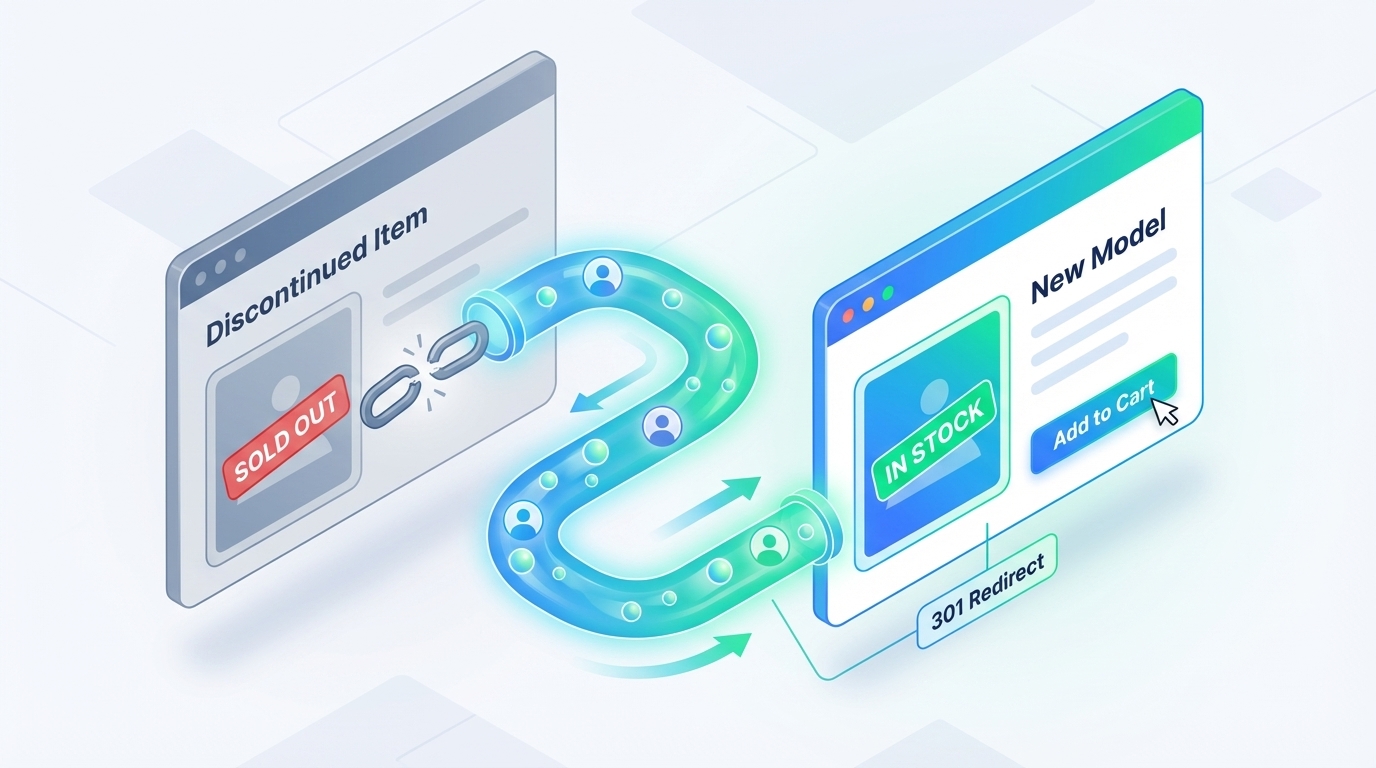
Individual product pages often accumulate authority from external backlinks over months or even years of being active. When a page is deleted and returns a 404 error, all the link equity it earned is lost. Link authority represents the votes of confidence from other websites that search engines use to determine where your content should rank. Serving a 404 page results in the loss of all link equity that the page earned over its lifecycle.
A better approach is to use a 301 permanent redirect instead of a 302 temporary redirect for discontinued products. This is because temporary redirects do not transfer authority to the destination page. A 301 redirect effectively transfers link equity to the new destination. Following 301 redirect best practices ensures that search engines correctly associate the new URL with the historical authority of the old page. Correctly configuring these redirects allows you to pass 90-95% of the link equity you've earned to a new destination.
Instead of letting that value evaporate, you're essentially recycling it to bolster your current inventory. Preserving link equity should be the primary goal of any discontinued product strategy. Deleting these pages wastes authority that could otherwise be funneled toward active, revenue-generating products. By treating every URL as a long-term investment, you can build a more resilient search presence that endures beyond individual product lifecycles.
How 404 Errors Damage Crawler Efficiency
Search engine bots have a limited amount of time to spend on your site, often referred to as a crawl budget. When a site has thousands of dead links, these crawlers spend valuable time hitting 404 pages instead of discovering your newest arrivals. Wasted crawl budget can slow down the indexing of important updates and new product launches across the entire store. Broken links consume crawl budget unnecessarily.
A high volume of broken links also signals poor site health to search engines like Google. While a few errors are expected, a massive spike in 404 errors suggests the site is not being maintained properly. Negative site signals can potentially affect your overall rankings, as search engines prioritize sites that provide a smooth, error-free experience. Focused efforts on reducing 404 errors will improve your overall site health and indexing speed.
The Bounce Rate Problem and User Intent
From a user experience perspective, landing on a dead page is one of the most frustrating things a shopper can encounter. A user who arrives from a search result only to find a generic error message will almost certainly bounce back. High bounce rates send a negative signal to search engines.
Satisfying user intent remains critical even when the specific item they wanted is no longer available. If you don't provide a clear path forward, you lose the customer to a competitor who likely has a similar product in stock. A strategic transition ensures that the user's journey continues rather than ending abruptly at a Page Not Found screen. Guiding users to a subcategory or a successor model keeps them within your sales funnel.
Determining the Status: Permanent vs. Temporary Discontinuation
Before applying any technical fixes, you must distinguish between a temporary out-of-stock situation and a permanent product retirement. Using the wrong strategy for the wrong status can accidentally de-index products that are coming back to the warehouse soon. Categorizing items as either temporary or permanent forms the foundation of your inventory SEO response. It prevents the loss of rankings for items that will soon be available for purchase again.
SEO Strategies for Seasonal or Temporary Stock Issues
When items are temporarily unavailable, they should remain active with an HTTP 200 OK status code. You don't want to redirect these pages because they'll eventually be relevant to the original search query again. Implementing a comprehensive "out of stock" SEO strategy allows retailers to maintain rankings even when inventory levels fluctuate. For items out of stock for four to eight weeks, keep the product in the XML sitemap.
To maintain your standing, remove the Offer property from the Product Schema markup to avoid schema penalties while the item isn't available. You should also avoid using phrases like "out of stock" directly in HTML. Google might interpret this as a soft-404, which can ruin rankings. Instead, retailers should place the 'out of stock' or 'item removed' text within an image rather than in the HTML to avoid a soft 404 penalty.
Consider adding an email signup form for "back in stock" notifications to keep users engaged. Email signups capture potential leads and keep the URL's ranking stable while you wait for new inventory to arrive. This approach ensures you don't lose the rankings you've worked hard to achieve during the brief period when stock is low.
Identifying Products That Will Never Return
A product is considered permanently discontinued when a manufacturer ends production or the brand moves to a completely new version. Once this status is confirmed, the SEO team must immediately initiate a permanent redirect. Delaying this process results in value leakage when traffic hits a dead end rather than being directed to a relevant page. Permanent redirects are the most effective way to manage the end of the product lifecycle.
The criteria for permanent removal should be clearly defined so the marketing team knows exactly when to trigger the sunset process. If a product has no direct successor and won't be restocked, it's a candidate for a permanent 301 redirect or a 410 status code. Identifying these items early prevents the accumulation of stale pages that no longer serve a commercial purpose. This keeps your site index clean and focused on your current offerings.
Technical Implementation of 301 Redirects for E-commerce
The 301 redirect is the most powerful tool in your SEO arsenal when dealing with discontinued products. It tells search engines that the old page has moved permanently to a new, relevant location. This simple technical instruction is what allows you to transfer authority and maintain a cohesive site structure as inventory evolves. It's the standard method for preserving link equity across a shifting product catalog.
Mapping to the Closest Relevant Product
The "next best thing" strategy involves redirecting a discontinued item to its most similar replacement. You should identify this successor based on features, price point, and the specific category it serves. This provides the best possible user experience because the customer finds something nearly identical to what they were originally seeking. Redirecting to a near-identical successor offers the highest likelihood of retaining the original page's ranking power.
The 301 redirect should point to the most relevant page, ideally, the subcategory page that the discontinued product originally came from. You should avoid redirecting to another product page, as this can lead to redirect chains. Redirect chains slow down your site and confuse search engine crawlers. By mapping discontinued items to stable, high-level category pages, you create a more sustainable internal linking structure.
This approach ensures that the link equity remains within the correct topical silo of your e-commerce store. Search engines recognize the topical relevance between the old URL and the new destination, making the transition seamless for the algorithm. It's better to redirect to a stable category than a specific SKU that might also be discontinued in the near future. This maintains the integrity of your site's architecture over the long term.
Utilizing the 410 Gone Status for Permanent Removals
While 301 redirects are preferred for preserving value, search engines consider a 410 status code stronger than a 404. The 410 code stands for "Gone" and explicitly signals to search engines that the URL was intentionally removed. This is the best practice for products with no relevant alternative, where you want to clear the index quickly. It tells Googlebot not to bother checking the URL again in the near future.
Using a 410 code can help prune your site of irrelevant pages that no longer provide value or attract traffic. It's a cleaner signal than a 404, which can sometimes be interpreted as a temporary error. If a product has no historical link equity and no traffic, a 410 is often more efficient than a redirect. This ensures your crawl budget is spent on pages that actually contribute to your bottom line.
Step-by-Step Redirect Guide for Major Platforms
On Shopify, you can manage redirects by navigating to Online Store and then to the Navigation section. Click URL Redirects, then select Create URL Redirect to enter your old and new paths. Shopify handles the server-side configuration automatically once you save the changes. This is a straightforward way to manage individual SKU retirements for smaller inventories.
For Magento users, the process involves using the URL Rewrite Management tool under the Marketing menu. You can create a new rewrite, select the product, and specify the target path for a 301 redirect. Magento allows for more complex bulk updates, which is helpful for larger retailers. Ensure you clear your cache after implementing these rewrites so they are live for users.
BigCommerce provides a 301 Redirects section under the Server Settings menu in the control panel. You can manually add redirects or upload a CSV file for bulk mapping across your store. This platform also offers an "automatic redirect" feature when you change a product's URL, which helps prevent accidental 404s. It's a robust system for maintaining a clean site structure during inventory updates.
XML Sitemap Hygiene and GSC Management
Discontinued product pages should eventually be removed from your XML sitemap to signal to Google that they're no longer a priority. While the 301 redirect handles the traffic, the sitemap should reflect your current, active inventory. This helps keep your index coverage reports clean and ensures search engines focus on your most important pages. It ensures the transition happens smoothly without index coverage errors.
Monitoring Crawl Stats and Index Coverage reports in Google Search Console is necessary to ensure the transition happens smoothly. You can track how quickly Google is recognizing your redirects and identify any lingering errors that need attention. Proactive management of your sitemap and GSC data is a vital step in a professional product sunsetting strategy. It provides the data you need to assess the success of your redirect mapping protocol.
How to Automate Redirect Mapping for 10,000+ SKUs
Manual mapping of discontinued products is often impossible at scale for enterprise e-commerce sites with tens of thousands of SKUs. This requires more sophisticated approaches using automation and logic-based redirects. Developers can set up logic-based scripts that automatically match discontinued IDs to successor IDs or the nearest parent category. This provides a safety net that protects your site's authority during massive inventory shifts.
You can use regular expressions (regex) for category-level redirects to handle large groups of URLs with a single rule. For example, a regex rule can redirect any URL that contains a specific discontinued brand name to that brand's successor landing page. Regex rules allow your team to focus on high-priority SKUs while the system handles the rest.
Automation ensures that no page ever drops to a 404 error without a human having to intervene for every single item. You should balance automation with manual oversight for high-traffic "hero" products to get the best of both worlds. Using these rules helps you maintain a clean site structure without a massive manual workload. Automation is the only way to scale an e-commerce business while maintaining high SEO standards.
Enhancing UX with Informational Overlays and Product Recommendations
A redirect alone isn't always enough to satisfy a customer who had their heart set on a specific item. If they're suddenly transported to a different page without explanation, they might feel confused. Using on-page elements to guide the user toward a purchase is essential for maintaining high conversion rates. Guidance on the page transforms a frustrating error into a helpful discovery experience for the shopper.
The Psychology of "Similar Product" Suggestions
Showing "People also bought" or "Recommended alternatives" prominently on discontinued product pages can pivot user frustration into new product discovery. When a customer sees that their first choice is gone but an improved version is available, they're much more likely to stay. Alternative recommendations leverage the user's existing intent. It's a powerful way to manage inventory turnover without losing revenue.
These recommendations should be visually prominent to capture the user's attention before they decide to hit the back button. If you're using a custom 404 page for items that aren't redirected, include search functionality and navigation options to help them browse. A custom 404 page that includes relevant recommendations will help users appreciate the helpful interface. Customized search functionality significantly reduces bounce rates compared to a generic error message.
Utilizing Informational Overlays for Product Education
Soft redirects or overlays can inform the user that a product is discontinued before they're moved to a new URL. A small banner can explain that "Product X has been replaced by the improved Product Y," providing the necessary context. Informational banners reduce the jarring nature of a 301 redirect and build trust through transparency. It helps the customer understand that they're being guided to a better option.
When you explain why a product is gone, such as an upgrade to a newer model with better features, you add value. The customer feels informed rather than redirected against their will. Transparent communication helps maintain a positive brand image. It demonstrates that you're looking out for the customer's best interests.
Reducing Customer Friction During the Transition
Clear messaging about discontinuation can prevent a flood of customer support inquiries and help build long-term trust. If a shopper knows exactly why they can't find an item, they won't waste time emailing your team about restocks. Transparency about the product lifecycle is an often-overlooked aspect of modern customer service. Proactive messaging keeps your support team focused on more complex issues.
When launching successor products, introduce replacement products so they can rank before the predecessors are removed. This ensures replacement products rank adequately before you redirect high-traffic discontinued items. Correctly timing these updates is a strategic way to maintain visibility for your most important categories. It's a seamless transition that benefits both the user and your bottom line.
Maintaining the Content Value of "Legendary" Discontinued Products
Some product pages have so much traffic and unique content that they should never be redirected or deleted. These are often legacy items that still generate significant search volume for research or collector purposes. Keeping these pages alive can serve as a powerful top-of-funnel traffic driver for your brand. They continue to attract visitors who are interested in the history of your niche.
Converting Product Pages into Informational Resource Hubs
If a product page ranks well and contains content people still find useful, keeping it live with discontinued messaging is often the best choice. The technical information or manuals for a discontinued product remain valuable even if the item cannot be bought. You can remove the "Add to Cart" button and replace it with a comprehensive guide or a product history. This allows the page to continue ranking for informational queries.
Historical product pages continue to generate search volume for research purposes years after discontinuation. A perfect example is the Cannondale Prophet mountain bike, which received continued search interest from 2008 through late 2013. Search interest for the model remained high five years after it left the market. Parking legacy pages as resources leverages your site's history to build authority.
These resource hubs should still include internal links to your newer, currently available models. Resource hubs attract users seeking information. It's a way to leverage your site's history to build authority in your niche without cluttering your active store. You turn a legacy page into a permanent lead generator.
Leveraging User-Generated Content and Reviews Post-Retirement
Discontinued product pages often accumulate valuable customer reviews and user-generated content that provides long-tail keyword relevance, which is hard to replicate. Deleting these pages means losing all of those authentic "votes" from your customers. Keeping these reviews visible helps maintain the page's authority and provides social proof for your brand as a whole.
Even if the product is gone, the positive feedback about your service and product quality remains relevant to new shoppers. It demonstrates a long history of customer satisfaction that can influence future buying decisions across your entire catalog. Reviews also help the page rank for specific "real-world" queries that shoppers use when researching. Preserving this content is vital to maintaining a comprehensive digital footprint.
Performing a Sitewide Audit of Legacy URLs
Regularly auditing your legacy URLs is necessary to catch 404 errors that may have slipped through the cracks. You can use tools like Screaming Frog and Semrush to crawl your entire site and identify broken links or complex redirect chains. This audit helps you see where equity is leaking and where redirects need updating. Regular audits are a fundamental part of maintaining a high-performing e-commerce platform.
You should also use Ahrefs to identify high-authority URLs that are currently returning a 404 status. These are discontinued product pages with external backlinks that are currently wasting that potential equity. By pointing these URLs to relevant successors, you can recover significant ranking power for your store. Correcting these errors can result in a quick boost to your organic visibility.
Auditing should be a recurring task for any e-commerce site with a high inventory turnover rate. It ensures your internal linking structure stays clean and users never hit a dead end. Updating your redirects based on fresh audit data keeps your site architecture lean and efficient. This proactive maintenance is what separates successful retailers from those who struggle with fluctuating rankings.
Auditing Internal Links to Remove Dead Ends
Even with 301 redirects in place, it's best practice to update internal links on blog posts, navigation menus, and category pages. You should point these links directly to the new URL to reduce the number of redirect chains on your site. This simple step improves site speed and provides a much better experience for both users and crawlers. Updating internal links ensures that equity flows as directly as possible to your active pages.
Discontinued products should be removed from category pages and navigation menus as soon as they're gone to prevent users from accessing dead links. If the discontinued page is itself a category page, it should be removed from all menus and on-site backlinks. Cleaning up your internal structure is vital to maintaining a high-performing e-commerce platform. It prevents your site from feeling cluttered with unavailable items.
Integrating Discontinued Product Management into the Product Lifecycle
SEO should be part of a product's entire lifecycle, from the initial launch to its final retirement. A siloed approach in which merchandising and marketing don't communicate is a leading cause of SEO value loss. When teams work together, the transition from old to new becomes a strategic advantage rather than a technical headache. Team coordination is key to professional product lifecycle management.
Collaboration Between Merchandising and SEO Teams
Merchandising teams should give SEO teams advanced notice of product retirements. This allows the SEO team to prepare redirect maps and content updates before the product actually goes out of stock. A seamless transition is only possible when the data flows freely between these two critical departments. Cross-departmental collaboration turns inventory turnover into a predictable process.
Establishing a standard workflow where SEO is alerted to inventory changes ensures that no high-authority URL is ever left to rot. The merchandising team knows which products are being replaced, and the SEO team knows how to preserve the traffic. This collaboration also helps identify legendary products that should be kept as resource hubs. Departmental synergy is the difference between reactive firefighting and proactive growth for your brand.
Monitoring Traffic Trends After Decommissioning
Tracking organic traffic trends on destination pages after implementing redirects is necessary to assess whether redirects successfully convert inherited traffic. You need to see if the inherited traffic is actually converting or if users are resulting in high bounce rates. If a redirect is resulting in ranking losses, you may need to adjust the destination to something more relevant. Consistent monitoring ensures that your site's authority remains strong as your inventory evolves.
Post-launch analysis allows you to refine your strategy and learn what types of redirects work best for your specific audience. If you notice that category-level redirects are resulting in search engines evaluating them as soft 404s, you might focus more on direct successor mapping. This iterative approach helps you maximize the ROI of your discontinued pages. Iterative analysis ensures that every retired URL continues to provide value to your business.
Establishing an Internal Policy for URL Retirement
An internal policy ensures that every department understands the technical requirements for retiring products. This document should outline the specific criteria for using 301 redirects versus 410 status codes. By standardizing the process, e-commerce brands can prevent accidental 404 errors during seasonal updates. The policy should also include a schedule for auditing legacy redirects to ensure they still point to relevant destinations.
Drive More Sustainable SEO Growth with Brand Voice
Every discontinued product is an opportunity to strengthen your site's authority, not a reason to lose hard-earned traffic. By treating every URL as a long-term asset, you can build a resilient digital presence that survives the natural lifecycle of your inventory. A proactive, technical approach to product sunsetting is what separates market leaders from those who struggle with fluctuating rankings and lost revenue.
Brand Voice specializes in creating ready-to-publish, SEO-optimized articles and product strategies that drive inventory turnover and translate into long-term organic growth. We help you focus on your core operations while we handle the intricate details of your technical SEO and content creation.
Schedule a demo today to see how Brand Voice can deliver content at scale that drives traffic and generates real results for your ecommerce brand.